Help
Help for this screen
You are already on the FAQ. Use the search box at the top of the page, or the “Jump to” links, to find your answer.
Frequently Asked Questions
Everything you need to know about American mahjong — the tiles, the card, the Charleston, and playing with us.
Need the current National Mah Jongg League card? Buy it from the League. Get your card
Getting started
What is American mahjong?
American mahjong is a friendly, four-player tile game where the goal is to be the first to build a complete 14-tile hand. What you're building comes from a printed card that lists that year's winning hands. It's played face-to-face around a table with plenty of chatter, and it's just as much about the company as the tiles.
How is American mahjong different from other kinds of mahjong?
The biggest differences are the joker tiles and the yearly card. In American mahjong you can only win with a hand that appears on the card, and jokers act as wildcards to help you get there — two things you won't find in the classic Chinese game. If you've played another style, expect the tiles to feel familiar and the rules to feel new.
Do I need to read Chinese to play?
Not at all. The tiles have Chinese characters and symbols, but you'll learn to recognize them by their look, not by reading them. Within a session or two you'll spot a Bam or a Dot at a glance.
How many people do I need?
American mahjong is built for four players. You can play with three using a few small adjustments, and many apps let you fill empty seats with computer players so you're never stuck waiting for a fourth.
What do I need to get started?
Just three things: a set of tiles (with racks and dice), the current card, and three other players. If you're learning online, an app supplies the set and the card for you, so all you really need is a device.
What is "the card"?
The card is a small foldout that lists all the winning hands you're allowed to make. Think of it as the menu — every hand you can win with is printed on it, along with how many points it's worth. You keep it in front of you the whole game and match your tiles to one of its lines.
Where do I get the card, and how often does it change?
The most widely used card comes from the National Mah Jongg League and is refreshed every year, so regular players buy a new one each spring. You order it directly from the League (use the Get your card link at the top of this page), or pick one up wherever mahjong supplies are sold. A fresh card keeps the game interesting because the winning hands change.
Find My Mahjong does not provide, display, sell, or distribute the National Mah Jongg League card. To play with the NMJL hands you must own your own current, legally purchased card — you can order one directly from the League at nationalmahjonggleague.org.
Where do I buy the current National Mah Jongg League card?
Straight from the League's own store: Get your card (opens the National Mah Jongg League store in a new tab). The League prints a new card every year, so make sure you have the current one before you play.
Find My Mahjong does not provide, display, sell, or distribute the National Mah Jongg League card. To play with the NMJL hands you must own your own current, legally purchased card — you can order one directly from the League at nationalmahjonggleague.org.
How long does a game take?
A single hand usually runs 10 to 20 minutes, and a full sitting is however many hands you feel like playing. Many groups settle in for a couple of hours. It's easy to stop after any hand, so it fits a lunch break or a long afternoon.
Is it hard to learn?
The basics come quickly — most people can play a full hand after one lesson. Reading the card and passing tiles take a little practice, but they click faster than you'd expect. Give yourself a few games to feel comfortable, and it becomes second nature.
Can I practice online or against a computer?
Yes, and it's a great way to learn without pressure. Apps let you play at your own pace, take back mistakes while you're learning, and practice against computer opponents anytime. Once you're comfortable, jumping to a real table feels natural.
What is the Help button at the bottom of the page?
The Help button (a magnifying glass; on a phone just the glass) sits at the bottom left of most pages. Press it and a small panel opens with a link straight to the part of this FAQ about the screen you are on - the card page opens Reading and using the card, a find-a-game page opens Playing online / finding a game, the store opens Shopping in our store, and so on.
If the button looks greyed out, it still works: no single FAQ section is about that screen, so it brings you to the whole FAQ, where you can search. A few pages (inside a game, for example) have their own help instead.
How do I find one particular answer in the FAQ?
Use the search box at the top of this page. Type a word or two — joker, charleston, card — and press Search; every matching question opens so you can read the answers without clicking each one. Press Clear to go back to the full list.
If you'd rather browse, the Jump to links under the search box take you straight to any section, and each section has a Back to search link to bring you back up.
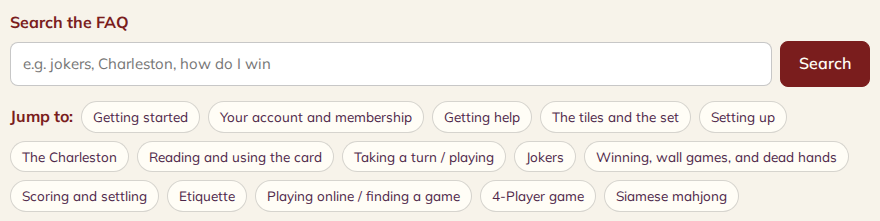
- 1 Type one or two words here — joker, charleston, card. One word usually works better than a whole question.
- 2 Press Search. Every matching question opens itself, so you can read the answers without clicking each one. A "Clear" link appears next to it to bring back the full list.
- 3 Or browse: "Jump to" takes you straight to any section. Each section has a "Back to search" link to bring you back up here.
Your account and membership
What is my account number, and where do I find it?
Every member has a permanent account number that looks like 2026-09-X45WQSKG. The first part is the year and month you registered; the rest is an eight-character code that belongs only to you.
You'll find it on your player profile. Sign in, open your profile, and it's shown near the top.
It never changes — not even if you change your user ID, your email or your display name. That's the point of it: it's the one thing about your account that stays put.
Why would I need my account number?
It's the fastest way for us to find you. Quote it whenever you contact support and we can pull up your account straight away, without a back-and-forth about which email address you used or how your name is spelled.
If you're opening a support ticket, we'll ask for it. Have it to hand and you'll get an answer sooner.
Can two members have the same account number?
No. Every account number is unique, and the system won't allow a duplicate to be created. If you've been given a number that someone else appears to be using, that's a fault worth reporting to us — it shouldn't be possible.
What is a registration code, and do I need one?
A registration code is a short code we hand out — at a tournament, through a club, or directly from us — that lets you register straight away.
You don't always need one. If your details already match a roster we hold, you can register without a code. The code is there as a safety net so that nobody who's genuinely invited gets turned away just because a name or phone number is written slightly differently than we have it.
If you were given a code and it isn't working, don't keep retrying — contact us and we'll sort it out.
Is there a free trial, and do I need a card to start?
Yes, there's a free trial, and no, we don't ask for a card when you sign up. You can register and start playing without entering payment details at all.
The card is asked for at the end of the trial, not the beginning. Nothing is charged before then, and you're not signed up to anything by starting the trial.
What happens when my free trial ends?
On the eighth day you'll be asked for a payment method to carry on. Until you add one, membership features are paused rather than cancelled — your account, your profile and your history all stay exactly as they were.
Add a card whenever you're ready and everything picks up where it left off. If you decide the site isn't for you, you don't need to do anything: nothing is charged, because we never took a card in the first place.
What does membership cost?
There's a monthly option and an annual one, and the annual works out cheaper over a year.
Current prices are shown on the membership pages in the store — we'd rather point you at the live figure than quote one here that could fall out of date.
How do I cancel my membership?
Go to My account > Membership & Billing and press Cancel membership, then confirm. Your renewal stops right away and nothing more is charged. You keep playing until the end of the period you already paid for; the page shows the date. If your payment is past due, there is no paid time left, so the membership ends the day you cancel. Membership fees already paid are not refunded (Terms 9.2). We send you one e-mail confirming the cancellation.
Your profile and your game history aren't deleted when you cancel - if you come back later, join again from the same page and they're still there. A complimentary or lifetime membership has nothing to cancel. Your first 7 days are free, so you can try everything before you pay.
What does membership include? Is there a separate priority membership?
There is one membership: the monthly or annual plan you choose when your free trial ends. It includes everything, priority seating too: when a full game frees up a seat, members are offered it first.
There is no separate priority membership to buy any more. Priority starts once your plan is paid; it isn't part of the free trial.
What is my User ID, and how do I change it?
Your User ID is the name other players see across the games, feeds and leaderboards - it keeps your real name off the site. You can also sign in with it instead of your e-mail address.
It is 3 to 10 characters: letters, numbers, underscore (_) and hyphen (-). No two members can have the same one, and capitals don't count (JanePlayer and janeplayer are the same).
If your account did not start with our sign-up form, you were given a starter User ID such as player1234 on your first visit. To change it, open your profile and type the new User ID. We e-mail a 6-digit code to your e-mail address; enter it and the change is made.
Where do I pay for my membership?
Tap Membership at the top of any page (on a phone it's in the menu). That opens Quick Pay: choose monthly or yearly, enter your card and press Pay. Your membership starts as soon as the payment goes through. If you're not signed in, you'll be asked to sign in or join first, then you come straight back.
If you put a membership in the Store cart, Checkout takes you to the same Quick Pay page with that plan already chosen. A membership is one per person.
Why is tax added to my membership?
Texas treats online games and memberships as a taxable service, so members who live in Texas pay Texas sales tax (state plus local) on top of the membership price. Members who live outside Texas pay no sales tax.
That's why Quick Pay asks for your city and state before you pay (no street address or ZIP code), and a phone number if we do not have one. It shows the price, the tax and the total, and the Pay button shows the total you'll be charged. If we don't have your state yet, the tax is worked out as if you were in Texas, where Find My Mahjong is based. If you move, update your city and state on Quick Pay before your next payment.
When do I get my receipt? Can I have it e-mailed again?
Your receipt (your invoice) is e-mailed to you right after you pay, usually within a minute. If our mail server is busy it is kept and sent again automatically.
We send one e-mail per purchase. For a store order that e-mail is your invoice, with the items you bought and a PDF copy attached - there is no separate order confirmation e-mail.
For a membership: if you press Email my invoice after it was sent, nothing new is sent - the page tells you the address it went to and when (for example "Your receipt was sent to j***@g***.com on Nov 1, 2026 at 10:35 PM"). Check your spam or junk folder if you cannot find it.
Need another copy of a membership receipt? Press Print invoice on the thank-you page, or open Membership & Billing and use Print next to the purchase under Receipts - you can print or save it as a PDF any time.
Can I pay for my membership with PayPal?
Yes. Open Quick Pay (tap Membership at the top of any page), choose monthly or yearly, check your city, state and phone, then press the yellow PayPal button. PayPal opens in its own window: sign in and approve the total shown (the price plus any Texas sales tax). Your membership starts as soon as PayPal confirms the payment - you don't need to send us anything or tell us you've paid. If you close the PayPal window or cancel, nothing is charged.
PayPal does not renew by itself. A few days before your renewal date we e-mail you a Pay now link back to Quick Pay. If you'd rather it renew automatically, pay by card on Quick Pay instead.
What will my statement show?
Find My Mahjong is part of Trans-System International Company, which processes our payments. Your card statement will show this charge as TSI - TransSystem International Company 1-254-294-1004.
If you pay with PayPal, your PayPal account will show the payment to TSI - TransSystem International Company 1-254-294-1004.
This is the same for memberships (Quick Pay), classes and store orders. The line is also on your receipt e-mail and your invoice. Don't recognise a charge? Call the number above or contact us before you dispute it - we answer every one.
Why do I get a code when I sign in?
To keep your account safe, every time you sign in with your password we ask you to confirm it's you with a one-time 6-digit code.
After your password, choose where the code goes: a text to the phone on your account or an e-mail to the e-mail on your account. We only show part of each (for example ***-***-1234 or d*****@g****.com) so nobody looking at the screen sees your full number or address.
The code works for 10 minutes, only in the browser where you asked for it. You can ask for a new code, or switch between text and e-mail, up to 3 times per sign-in.
If you replied STOP to our texts, we can only e-mail your code.
Can I pay in 4 with PayPal (Pay Later)?
When PayPal offers it to you, a second button, Pay Later, appears under the PayPal button on Quick Pay and at the store checkout. It is PayPal's Pay in 4, on orders of $10 or more: PayPal pays us the full total now and you pay PayPal back in parts, on PayPal's terms. PayPal decides whether you can use it (it depends on the amount, your country and your PayPal account) - if you don't see the button, it isn't available for that purchase. Everything else is the same as paying with PayPal: you approve the total shown (with any Texas sales tax), and your membership or order is confirmed as soon as PayPal confirms the payment.
I can't get my sign-in code (or it expired). How do I get in?
If the code expires, is typed wrong 5 times, or you press "I can't get a code", you need to reset your password before you can sign in. Until you do, your old password will not work - this protects you if someone else knows it.
Go to Forgot your password? and either have a code texted to your phone or get a reset link by e-mail. After the reset, sign in with your new password.
For your safety our staff cannot skip the code for you.
It says "Too many sign-in attempts". What now?
After 5 wrong passwords within 15 minutes, sign-in for that login pauses for 15 minutes. Wait and try again, or reset your password at Forgot your password? - a reset ends the pause right away.
A new password must be at least 10 characters, must not contain your e-mail or user ID, and must not be a commonly used password.
I got a "New sign-in to your account" e-mail. Is that real?
We send it when your account is signed in to from an internet address we have not seen for you before (for example a new phone, a new Wi-Fi or a trip). It shows when (Central time), the address and the browser. You get it only once per address.
If it was you, there is nothing to do. If it was not you, reset your password right away.
Where is my order?
When your store order ships we e-mail you at each step: when it ships, when it is out for delivery, when it is delivered, and if the carrier reports a delivery problem. You get each of these e-mails once. They come from Find My Mahjong and have a See order button.
To see where your order is at any time, log in and open My account > Orders, then your order. Each delivery shows where it is (Shipped, In transit, Out for delivery, Delivered, or Delivery problem), the carrier, and the tracking number - tap it to follow the parcel on the carrier's page. The See order button in our e-mails asks you to log in, so only you can open your order.
We send shipping updates by e-mail only - no texts. If the carrier reports a problem we are told at the same time and will contact you. Questions? Contact us.
Why did the store send me back to checkout with a new shipping price?
When you pay for a store order, the delivery option you picked is priced once more for the address the order ships to, and compared with the shipping on your order. This matters when the delivery address was changed after you picked the option - for example in My account - because shipping to another ZIP code can cost more or less.
If the price is no longer the same, the payment is not taken. You are sent back to the checkout with Shipping changed for your new address - please review your total; the shipping and the total there are already the new ones. Check them and go on to payment again. If the option can no longer ship to the address at all, you are asked to choose another delivery option. You are never charged the old shipping price, and never a new one you have not seen.
I forgot my password. How do I reset it?
On the sign-in page press Forgot your password?. Enter the mobile phone on your account, or your login (your e-mail or User ID), and press Text me a code. We text a 6-digit code to the mobile number on your account - never to any other number. Enter the code with your new password (at least 8 characters) on the next page.
The code works for 10 minutes and allows 5 tries. You can ask for a code up to 3 times an hour. For your security the page looks the same whether or not an account was found; if no text arrives, check the number on your profile or ask us through the Support page.
Getting help
How do I get help or report a problem?
Start with the Support page. It has this FAQ, and if the answer isn't here you can open a support ticket from the same page.
A ticket goes straight into our work queue, gets a reference, and you can see whether it's still open or has been closed — all from your own profile, without needing any extra login.
Tickets are the best way to reach us. They don't get lost, and everything about your issue stays in one place.
Do I have to be signed in to open a support ticket?
Yes. The ticket form needs you signed in with a player profile, so that we know the ticket really came from you and so your account number is attached automatically.
If you can't sign in — which is exactly when you most need help — email us at hello@findmymahjong.org instead. Tell us your name and, if you know it, your account number, and we'll open the ticket for you from our side.
This FAQ never requires a sign-in. If your question is answered here, you don't need a ticket at all.
How do I know if my ticket has been dealt with?
Your own tickets are listed on the Support page when you're signed in, each showing whether it's still open with us or has been closed.
That status comes from the same system our team works in, so what you see is the real state of your ticket — not a separate copy that could drift out of step.
What should I include when I report a problem?
The more precisely you can say what happened, the faster we can fix it. Helpful things to include:
- What you were doing when it went wrong — which game, which screen.
- What you expected to happen, and what happened instead.
- Roughly what time it was.
- Whether it has happened more than once.
Your account number is attached to the ticket automatically, so you don't need to look it up.
What is the welcome box, and how do I earn a free year by reporting issues?
The first time you visit in each round you see a short Welcome to Find My Mahjong box. Press Got it - take me in and it does not show again in that browser until the next round.
While our Issue Reports program is running, signed-in members can press Report Issues at the top of their My Profile page to tell us about anything that does not work the way it should (up to 5 reports in 24 hours). Our thank-you: 4 valid issue reports in one round earn one year free - if you have already paid, the free year is added to the end of your paid period. Our team decides which reports are valid.
Classes and lessons
How do I sign up for a class, and how do I pay?
Find a class under Classes and open it. Sign in, then press Enroll in this class (a free class) or Enroll & pay (a paid class). A free class confirms your place at once.
For a paid class your place is held for 30 minutes while you pay by card; it becomes yours when the payment goes through, and we e-mail your receipt. If you do not finish paying, the hold is released and the place goes back on sale.
How do I join an online class?
Once your place is confirmed (and paid, for a paid class), the class page shows Join the online class. It opens the class waiting room, which refreshes itself while you wait. When the instructor starts the class, the room shows the dial-in number and PIN of the class phone line (call in for the sound), the online join link and the table - the number and PIN are shown only while the class is live. Only the instructor and students who hold a place can enter the room.
What if a class is cancelled after I paid?
If a class is cancelled after you paid - or your payment arrives after the class was cancelled or filled - you do not keep a place, and your payment is marked refund due. Our office refunds it. Questions? Use the Support page.
Shopping in our store
How do I buy something from the store?
Open Store, pick an item and press Add to cart. When you are ready, open the cart and press Checkout. There are three steps: Order (your cart), Address and Payment.
For things we do not ship (a membership, a digital item) the address step asks only your name, e-mail, phone, city and state. For things we ship it asks your full shipping address. At the payment step you read the Terms and tick I agree to the terms & conditions, then pay by card or with PayPal.
How do I remove something from my cart?
In the cart, press the trash can (Remove from cart) on the line you no longer want. To change how many you buy, use the quantity box on that line.
How is shipping worked out?
Shipping is priced live at checkout for your address. Each item ships in its own box, so the price follows the size and weight of what you buy. While the prices come in you see Checking delivery options for this address.... Only the delivery methods that can deliver to your address are shown; if none can, you see We can't ship to this address online - please contact us. and checkout stops there.
The price is checked again when you pay, so if you change your address, choose the delivery method again. We ship to addresses in the United States; most orders ship within 3 business days (Terms 9.3).
Why do I have to tick "I agree to the terms" at the store checkout?
When you buy from our store, the payment step asks you to tick I agree to the terms & conditions before you pay. The box stays locked until you have read the Terms: press Read the Terms (or the terms & conditions link) and they open in a panel on the same page. Scroll to the end, close the panel, and the box can be ticked. The pay buttons (card, PayPal and Pay Later) stay grey until it is ticked.
We keep a note of when you agreed and which version of the Terms you agreed to. If the Terms change before you pay, you are asked to read them and agree again. Quick Pay (memberships) asks the same way, above the card box and the PayPal buttons.
Why don't I see every delivery option at the store checkout?
When you buy from our store, the checkout asks the carrier for a price for each delivery option, for the address you are shipping to. Not every option is offered for every address - for example, some next-day and ground services are not offered for an address in the same town as our warehouse. An option the carrier cannot price for your address is simply not shown, and the options that are shown come with their price. While the prices are coming you see Checking delivery options for this address...
If you change the delivery address, the options are checked again for the new address, so an option you did not see before can come back. If no option can ship to your address you see We can't ship to this address online - please contact us. and the order cannot go on to payment - please contact us and we will sort out the shipping with you. When you pay, the option you picked is checked once more; if it is no longer offered for the address, you are asked to choose another one.
The tiles and the set
What tiles are in a set?
An American set has three number suits, plus Winds, Dragons, Flowers, and jokers. Altogether it's 152 tiles. Don't worry about memorizing them all at once — you'll pick them up as you play.
What are Bams, Dots, and Cracks?
These are the three number suits, each running from 1 to 9. Bams show stylized bamboo sticks, Dots show little circles, and Cracks show a number above a Chinese character. They're the backbone of most hands.
What are the Winds and Dragons?
The Winds are four tiles — North, East, West, and South. The Dragons are three kinds — Red, Green, and White — and each Dragon is paired with one of the number suits in play. Both show up often on the card.
What is "Soap"?
"Soap" is the friendly nickname for the White Dragon, because the tile often looks like a plain white bar or a blue frame — a bit like a bar of soap. It counts as the White Dragon wherever the card calls for one. You'll hear players ask for it by this name at the table.
What are Flowers used for?
Flower tiles are used inside certain hands on the card, often as a matched group. Unlike some other mahjong styles, they aren't bonus tiles you set aside — in the American game they're part of the hand you build. The card tells you when a hand needs them.
What are jokers?
Jokers are wildcards that can stand in for a tile you're missing inside a larger group. A set includes eight of them, and they're one of the things that make the American game so forgiving for newcomers. There are a couple of places you can't use them, which we cover below.
How many tiles are in a full set?
A full American set has 152 tiles: the number suits, Winds, Dragons, Flowers, and eight jokers. It's more than a standard Chinese set, mostly because of the jokers and Flowers.
What's a good starter set to buy?
Any set labeled for American mahjong will have the jokers and Flowers you need, plus racks and dice. If you're just testing the waters, a basic set is plenty — you can always upgrade later. Playing online first is a no-cost way to decide if you want your own set.
Setting up
How do we shuffle and build the walls?
Turn all the tiles face-down and swirl them around the table to mix them — players call this "washing" the tiles. Then each player stacks tiles into a low wall in front of them, and the four walls come together into a square. From there the dealer breaks the wall and hands out tiles.
How long is each wall?
Each player builds a wall that's 19 tiles long and stacked two high. Four of those walls form the square you'll deal from. It works out perfectly to use every tile in the set.
Who goes first, and what do the dice do?
The dealer rolls the dice, and the total tells everyone where to break the wall so the deal starts in a fair, unpredictable spot. Play then moves around the table in order. The dice keep the starting point random every hand.
How many tiles do I start with?
You start with 13 tiles, except the dealer, who takes 14 and discards first. You'll sort them on your rack and start looking for a hand on the card. Don't panic if nothing lines up yet — that's what the Charleston is for.
The Charleston
What is the Charleston?
The Charleston is a passing round at the start of every hand where everyone trades tiles they don't want. It gives all four players a chance to improve their hands before real play begins. It feels strange the first time, but it quickly becomes one of the fun parts.
Which direction do the passes go?
The first Charleston is three passes in this order: to your right, across the table, and then to your left. Each pass is exactly three tiles. There's an optional second round that goes the other way — left, across, right.
What is the courtesy pass?
After the passing rounds, players may agree to a final "courtesy" pass straight across the table. It's optional and can be anywhere from zero to three tiles, by mutual agreement with the player across from you. It's a last chance to swap away a couple of stragglers.
Can we skip the second Charleston?
Yes. The second Charleston is optional, and any player can stop it — or the whole table can agree in advance to skip it. Groups differ, so it's worth asking how your table likes to play.
Can I stop the Charleston, and is that rude?
You're allowed to stop the optional second Charleston if your hand is already shaping up. It's a normal part of the game, though some players find it a little frustrating when it happens often. A friendly "I'm happy with mine" keeps it good-natured.
Can I pass a joker during the Charleston?
No — jokers can never be passed during the Charleston. They stay on your rack. If you're lucky enough to start with one, hold onto it.
What is a "blind pass"?
A blind pass is when you pass along one or more tiles you received without looking at them first. It's allowed in certain passes to keep things moving when you don't have enough tiles you want to give up. Check your table's rule on exactly when blind passing is okay.
What should I pass and what should I keep?
Pass away tiles that don't fit any hand you're aiming for, and keep pairs, Flowers, and jokers that give you options. Try not to hand your left-hand neighbor exactly what they seem to be collecting. Early on, keep two possible hands alive rather than betting everything on one.
How do I pass my three tiles in the Charleston online?
Pick exactly 3 tiles — they pop up into your pass box as you choose them — then press Pass (or just press Space) to send them.
Changed your mind about one? Click a tile in the pass box again to take it back out. The Pass button only appears once you are holding exactly three, so you cannot pass the wrong number by accident.
How do I stop the Charleston online, or decline a pass?
The required passes happen first. After those, an optional round opens and a Stop / decline button appears beside Pass. Press it to end the Charleston there, or pass again if your hand still needs help.
Stopping is a normal part of the game, not a snub — the table simply moves on to play.
How does the courtesy pass work on screen?
The optional last pass goes across the table, and the game asks you first. A chooser opens with the question "How many tiles would you like to pass?" and four answers: No Tiles, 1 Tile, 2 Tiles or 3 Tiles. No Tiles is the zero choice, so picking it is a proper answer rather than skipping the question.
You pass the lower of your count and your partner's, exactly as you would at a real table. If you want to change your mind before you commit, Change count re-opens the chooser.
Reading and using the card
How do I read a line on the card?
Each line on the card is a picture of one complete 14-tile hand, written in shorthand. You read it left to right as a series of groups — some numbers here, a pair there, maybe a Flower or Dragon. Once you learn the shorthand, a line tells you exactly which tiles to collect.
What do the colors on the card mean?
The three colors printed on a line stand for the three suits, but not any specific one. If a line uses two colors, it just means "two different suits" — you choose which. This is what lets one printed hand be built in several suit combinations.
What is a pung, kong, quint, and sextet?
These are just names for groups of matching tiles: a pung is three alike, a kong is four, a quint is five, and a sextet is six. A pair is two alike, and a single is one. The card tells you which sizes each hand needs.
What do "X" and "C" mean on the card?
An "X" beside a group means it can be exposed — placed face-up when you claim a tile for it. A "C" means the whole hand is concealed and must be built quietly on your rack. Concealed hands are harder, which is why they usually score more.
What is a concealed hand?
A concealed hand is one you build entirely on your own rack, without calling other players' discards along the way. You only reveal it when you win. Because you can't get help from the table, these hands are worth more points.
What does the number next to a hand mean?
That number is the hand's value — how many points the winner collects for it. Simple, common hands are worth less; tricky or concealed ones are worth more. It's a handy way to weigh an easy win against a bigger payoff.
How do I pick which hand to go for?
Look at whole sections of the card rather than hunting for one exact hand, and see where you already have the most tiles. Favor hands where you hold pairs, Flowers, or jokers. Stay flexible for the first few turns instead of committing right away.
Can I change my target hand partway through?
Yes, as long as you haven't locked yourself in with exposures that only fit one hand. Good players keep a backup in mind and pivot when the tiles aren't coming. Every exposure you make, though, narrows your options.
Why can't I just make up my own winning hand?
In American mahjong you can only win with a hand printed on the card — that's the rule that defines the game. It's what keeps every player working from the same menu. Making your own combinations is how other mahjong styles work, but not this one.
Taking a turn / playing
What happens on my turn?
On your turn you draw one tile from the wall, decide whether to keep it, and then discard one tile face-up in the center, saying its name out loud. Play passes to the next person. That simple rhythm — draw, decide, discard — repeats until someone wins.
What does it mean to "call" a tile?
Calling means claiming the tile someone just discarded because it completes a group in your hand. You announce it right away, take the tile, and place the finished group face-up on your rack. You can only call to make a group of three or more, never for a pair or a single.
When can I take someone's discard?
You can claim a discard in the short window right after it's thrown and before the next player draws from the wall. Speak up quickly — once the next player picks, the moment is gone. You'll only want it if it completes an exposable group for your hand.
What is an "exposure"?
An exposure is a group of tiles you place face-up on your rack after claiming a discard. It shows everyone part of the hand you're building. Once a group is exposed, it's locked — you can't rearrange those tiles later (except to swap in or out a joker).
Can I take back a discard I just made?
Generally no — once a tile is discarded and named, it's committed, and certainly once another player has reacted to it. Tables sometimes allow a quick take-back if no one has moved yet, but don't count on it. Take a breath before you throw.
What if two people want the same discarded tile?
When two players call the same tile, the one using it to complete a winning hand has first claim. Otherwise, priority usually goes by seating order around the table. Your table should agree on this before you start.
How do I discard a tile at the online table?
On your turn you throw exactly one tile, and there are three ways to do it. They all do the same thing, so use whichever feels natural:
- Tap the tile, then press Discard.
- Drag the tile onto the discard pile in the middle of the table.
- Double-click the tile.
Every action at the table can be done with a tap and a button; dragging is there if you have a mouse and prefer it. You never need both. If you would rather be asked before a tile leaves your rack, turn on Discard confirmation in Settings (the gear).
What do the Sort: Rank and Sort: Suit buttons do?
Sort: Rank lines up like-numbers across the suits, so all your 3s sit together. Sort: Suit groups them Bam, then Crak, then Dot, then the honors.
Sorting only rearranges your view of your own rack — it never changes your hand and it never reveals anything to anyone else. Both buttons are available any time you are holding tiles.
Someone discarded a tile I can use — how do I claim it on screen?
When another seat discards, a short window opens and you are offered the calls you can legally make with that tile — Call (pung), Call (kong) or plain Call. Pressing one exposes the discard face-up together with the matching tiles from your hand.
You only ever see the calls you are eligible for, so if a button is not there, that claim is not legal for your hand. Ignore passes on the tile and lets play carry on.
If the tile finishes your hand you are offered Mah Jongg instead, to win off the discard. A winning claim beats an exposure call, and the game arbitrates that for you — you do not have to argue for it.
How do I declare Mah Jongg online, and what happens if I am wrong?
Press the Mah Jongg button when your hand matches a line on the card.
The game is the referee. It checks your hand against the card itself, so a wrong call is simply caught and not scored — nobody has to challenge you, and you will not kill your hand by trying. That makes it a safe button to press when you think you are there.
I started a call or a Mah Jongg by mistake — can I back out?
Yes. When the game asks you to confirm a claim, the box that opens has a Cancel button next to the Mah Jongg one. Press Cancel and nothing happens — no tile is taken and no exposure is made.
Nothing is committed until you press the button that completes the action, so opening a box to look is harmless.
What is the Table log?
It opens a pop-up of the play-by-play — draws, discards, calls and passes — so you can catch up on what happened while you were thinking. It is read-only; close it and you are back at the board exactly where you were.
What can I change with the gear (Settings) while I am playing?
The gear opens your display settings, and they apply live: color theme, board size (the size of the board and the discards), discard confirmation and volume. Your choices are saved to your profile, so they follow you into every game. Tile style and table theme are listed too, marked coming soon - they do not change anything yet.
Rows that do not apply to the table you are on - game-setup options, or audio and video at a table with no live people - are grayed out with a short note saying why, rather than hidden.
What is the Card badge at the table?
The badge names the card of winning hands this table is scored to — for example NMJL 2026. Click it and the full list of hands opens in a pop-up you can keep open beside the board while you play.
It is read-only. Opening it never changes your game and never tells anyone what you are looking at.
Find My Mahjong does not provide, display, sell, or distribute the National Mah Jongg League card. To play with the NMJL hands you must own your own current, legally purchased card — you can order one directly from the League at nationalmahjonggleague.org.
How do I leave a game?
The Exit button in the top-left corner leaves the game and takes you back to the Launchpad at /play. On a solo or daily game your seat is not held once you leave, so step away at a point you are happy to leave.
Can I chat, or use my camera and microphone, at the table?
At a table with live human opponents — 4-Player Live or Friends — yes:
- Text chat — the Chat button at the top left, beside Exit, opens a message drawer so you can type to the table. It is the easy fallback when you would rather not be on camera.
- Camera and microphone — go live from your seat, then the microphone button mutes and unmutes you and the camera button turns your video on and off. Others still see your avatar while your camera is off. Output volume and both toggles also live in Settings.
They are off when you are playing house bots — a solo or daily game — because there is nobody there to talk to. They switch on by themselves the moment you sit at a table with real people.
Jokers
Where can I use a joker, and where can't I?
You can use a joker inside any group of three or more — pungs, kongs, quints, and sextets. You cannot use one in a pair, and you cannot use one as the single tile in a hand that calls for singles. Everywhere else, it's a welcome stand-in.
What is "redeeming" a joker?
Redeeming is swapping the real tile for a joker sitting in someone's exposed group. If you hold the actual tile the joker is standing in for, you can trade yours for their joker on your turn. It's a great way to put a joker to work in your own hand.
Where is the Swap Joker button?
On your turn - right after you draw from the wall or call a tile - the Swap Joker button shows whenever you hold the real tile for a joker sitting in any exposure on the table, yours or another player's. Tap it, pick the joker, and your tile takes its place. That is the National Mah Jongg League rule.
Find My Mahjong does not provide, display, sell, or distribute the National Mah Jongg League card. To play with the NMJL hands you must own your own current, legally purchased card — you can order one directly from the League at nationalmahjonggleague.org.
Can I take a joker off someone else's rack?
Only by redeeming it — trading them the genuine tile it represents from one of their face-up exposures. You can't just grab a joker, and you can't touch a joker that's still hidden on their rack. The swap happens on your own turn.
Can I claim a discarded joker?
No. Once a joker is discarded, it's dead for the rest of that hand and can't be picked up by anyone. Players sometimes discard a joker on purpose late in a hand to keep it away from others.
Winning, wall games, and dead hands
How do I win?
You win by completing all 14 tiles of a hand exactly as it's printed on the card. When you have it, you declare "Mah Jongg" and lay your tiles down for everyone to check. If it matches a card line, you win the hand.
What do I say when I win?
You call out "Mah Jongg!" — that's the signal that stops play so everyone can look. Then you show your hand and point to the line on the card it matches. Saying it clearly avoids any confusion at the table.
What is a "wall game"?
A wall game happens when the tiles run out before anyone completes a hand. Nobody wins and nobody pays — the hand is simply a draw. You reshuffle and start fresh.
What is a "dead hand"?
A hand is "dead" when it can no longer become a valid winner — most often because a player has the wrong number of tiles or made an exposure that doesn't fit any card hand. A dead hand can't win, but that player keeps drawing and discarding so the game flows normally. It's a normal hiccup, not a disaster.
What happens if I have the wrong number of tiles?
If you end up holding too many or too few tiles, your hand is declared dead and you can't win that round. You still play out the hand by picking and discarding as usual. It's why players quietly count their tiles now and then.
Can someone declare my hand dead?
Yes — if another player believes your exposures can't add up to any hand on the card, they can challenge it, and if they're right your hand is dead. If they're wrong, penalties may apply at some tables. It's meant to keep everyone honest, not to be unfriendly.
Scoring and settling
How does scoring work?
Every hand on the card has a point value, and the winner collects that value from the other players. Some hands are worth more because they're harder or must be concealed. Your group can play for points, small change, or just bragging rights.
Who pays the winner?
All three other players pay the winner. How much depends on the hand's card value and your table's rules about doubling. In a wall game, no one pays.
What does it mean that the "thrower" pays double?
At many tables, the player who discarded the exact tile the winner needed — or who "self-picks" it from the wall — pays double the hand's value, while the other two pay the base amount. It's a common house rule that rewards careful discarding. Confirm whether your table plays it this way.
What is a jokerless bonus?
Many tables pay extra for winning a hand without using any jokers, since that's harder to pull off. It's usually a doubling of the hand's value. Whether your group uses it is a table rule worth settling up front.
Etiquette
How fast should I play?
Keep a comfortable, steady pace — think before you act, but don't leave the table waiting. A good rhythm keeps everyone engaged and the hand moving. When you're new, a friendly table won't mind if you take a moment.
Should I keep my tiles on my rack?
Yes — your tiles stay on your rack, hidden from the others, until you expose a group or win. Keeping them up and orderly is both good manners and good defense. Sliding tiles around in the open gives away your hand.
Is it okay to complain about bad tiles?
It's best to keep the grumbling light. Everyone gets cold tiles sometimes, and constant complaining — "kvetching" — wears on the table. A little good humor goes a lot further.
What if I make a mistake?
Small mistakes happen, especially when you're learning, and most tables are gracious about fixing them if nothing has been built on the error yet. Once play has moved on, it's usually left as-is. Ask your group how they like to handle do-overs.
How do I win or lose gracefully?
Congratulate the winner, pay up without fuss, and enjoy the next hand — the mood at the table matters more than any single win. When you win, keep it warm rather than boastful. Gracious players are the ones everyone invites back.
Should I help brand-new players?
Absolutely — patient, encouraging help is how the game grows and how you got started too. Offer tips when asked and keep corrections gentle. Just be mindful not to play their hand for them.
What are "table rules"?
Table rules are the small variations each group adopts — things like doubling payments, courtesy passes, or how to settle disputes. They're all normal, and no two tables are identical. When you sit down somewhere new, ask how they play before the first deal.
Playing online / finding a game
How do I book a seat at a game, or join the waitlist?
Open the game and press Book a seat. If you are not signed in, we take you to sign in and then straight back to the game. The form asks only your phone, city and state - filled in from your profile when we have them - and saves them on your profile. We never ask for a street address.
If the game is full, the button reads Join the waitlist. Waitlisted players are seated automatically, in the order they joined, when a spot opens. Tournaments, fundraisers and leagues register with one click. You can book a game only once, and a game marked for women or men only can be booked only by players whose profile matches. Your bookings are listed under My games.
What is a fundraiser game, and are donations tax-deductible?
A fundraiser is a game or event that raises money for a cause. Find them under Find > Fund raiser. The game page shows who it supports and the fundraising goal.
Donations are tax-deductible only when the organizer names a registered 501(c)(3) charity sponsor; the page then names that charity (and its EIN). Find My Mahjong is not a charity and does not give tax advice - please confirm with the organizer or your tax advisor.
Can I play online?
Yes. There are apps and sites where you can play American mahjong against people or computer opponents, using the current card. It's perfect for practicing, playing when you can't gather a group, or connecting with players anywhere.
What's different about playing online?
Online, the app handles the shuffling, dealing, scoring, and rule-checking for you, which makes it a gentle way to learn. You lose a little of the tactile, social feel of a real table, but you gain the ability to play anytime. Many players enjoy both.
How do I find people to play with?
You can join a local club, take a class, or connect with players through a community like Find My Mahjong — that's exactly what we're here for. Online games are always a click away when you can't meet in person. There are more players out there than you'd think.

- 1 Start here. Put in your ZIP and how far you're willing to drive — results come back nearest first.
- 2 On a phone or tablet, tap "Use my location" instead of typing a ZIP.
- 3 Leave Variant and Skill on "Any" your first time. Narrow them later if a table turns out to be above your level.
- 4 From and To limit the list to a particular week. Leave them empty to see everything that is coming up.
- 5 Press Search. The games appear underneath, each one showing the venue, the date and how many seats are still open.
Can I practice by myself?
Yes — playing against computer opponents online lets you practice turns, the Charleston, and reading the card at your own speed. It's a low-pressure way to build confidence before sitting down with others. Even a few solo games make a real difference.

- 1 Name the Tile — a tile appears and you pick its name. The fastest way to stop hesitating over Bams, Dots and Cracks.
- 2 Terminology Quiz — the words you'll hear at the table: pung, kong, exposure, wall game.
- 3 Charleston Walkthrough — practises the passing order on its own, away from the pressure of a live hand.
- 4 Tile Match — a memory game for tile recognition. Practice covers the game's general mechanics only; it never includes any card's winning hands.
How do I get better?
Play often, study the card between games, and pay attention to what winning players discard and expose. Try practicing online to work on specific skills like the Charleston. Most of all, keep it fun — you improve fastest when you enjoy the game.
What is a venue, and how do I find games near me?
A venue is a real place where people meet to play — a club room, a community hall, a shop, someone's regular spot. Games listed at a venue are in-person games, not online ones.
Use the Find pages to search by city, state or ZIP and see what's on near you. Each listing shows where it is, when it starts and what it costs, and who to contact if you have a question about that particular game.
Who runs the games I see listed?
In-person games — tournaments, fund raisers, leagues and open play — are run by organizers: the club, host or group putting the event on. Find My Mahjong lists their events and handles the sign-ups, but the event itself is theirs.
That means any entry fee is collected by the organizer, not by us, and questions about a specific event are best put to the contact shown on that listing.
If something about a listing looks wrong, or an event doesn't run as described, tell us. There's a report control on every listing, and we follow those up.
Can I list my own game or run an event?
Yes. If you host a regular game, run a club, or want to put on a tournament or a fund raiser, get in touch through the Support page and we'll talk you through becoming an organizer.
Organizers can list events, manage seating and close registration when they're full.
Why can't I play Mahj-dle again today?
Mahj-dle is one game a day, the same for everyone. Once today's game is over, opening Mahj-dle shows your results and when your next one starts: midnight in your own time zone (Central time if your account has no time zone set). Until then you can play the other games on the Play page or practice.
What happens to my game during a site update?
A red banner tells you a few minutes ahead. If the update starts while you are playing, your game pauses - it is saved, the clock stops, and you can keep talking if you are on audio or video. When the site is back, your game picks up exactly where it was, by itself. You don't need to refresh, and nobody loses a turn.
4-Player game
What is the 4-Player live table?
The 4-Player live table seats up to four real people at one American mahjong game — the classic four-seat table, online. You reach it from the 4-Player tab on the Play page. Each person plays their own seat; there is no single operator driving the table for everyone.
How do I open a 4-player table?
On the Play page, open the 4-Player tab and choose one of its cards. Opening a table makes you the host and seats you at East. From there you can invite friends to take the other seats, or start straight away against house bots.
How do friends join my table?
Once you have opened a table, share it with your friends and each of them clicks an open seat — South, West or North — to sit down. Everyone at the table plays their own seat and sees the game from where they are sitting.
Can I play if I can't get four people together?
Yes — you never have to wait for a full table. When you (the host) start the hand, every seat no one has taken is filled by a house bot. So you can play a full four-seat game with one friend and two bots, or entirely against bots if you like.
Can I play 4-player right now against bots, with no waiting?
Yes. The Play with Bots card on the 4-Player tab opens a fresh table and seats you at East. Press Begin — deal with bots and the three empty seats become house bots, then the hand is dealt. It is a fresh, replayable game every time — play as many as you like.
Do the bots play a full game?
They do. The bots take their own turns automatically — the Charleston, drawing and discarding, calling and declaring — just like the single-player game. You never have to run their seats for them.
What do I see at the table — can I see the other players' hands?
You see the table from your own seat: your hand is along the bottom of the screen, the player who plays after you sits on your right, the player across from you at the top, and the player before you on your left. Every player at the table gets this same view of their own seat. You can only play your own hand. The other seats show their public side only: their name and picture (or a house bot), their face-up exposures, never their concealed tiles. During the Charleston you see that a player has passed, never which tiles. The discards in the middle, whose turn it is, and the referee's ruling when someone declares mahjong are shared by the whole table.
Which card does a 4-player table use?
The table plays by the live card of winning hands, and the referee checks every hand against it. When you open a table you are asked to acknowledge the card before you sit down, so everyone at the table is playing to the same set of winning hands.
Can I get matched with random players online, or invite friends for later?
Yes - all three are on the 4-Player tab of the Play page.
- Play LIVE - a random match with online players: we build your table, seat bots at your level and invite online players, so a person can take a seat before the first tile is thrown.
- Play with Friends - a private, friends-only table right now: your online friends are invited first, and house bots fill any empty seat until a friend takes it.
- Schedule with Friends - book a private game for a day and time you pick (up to 60 days ahead). The table opens itself when it is time, everyone you invited gets their seat invite, and house bots fill any seat still empty.
How is the 4-player game different from the daily puzzle and Single Player?
They are three different things. The daily puzzle is one shared, dated deal you play once a day, with a leaderboard. Single Player is a fresh random solo game against three bots that you can replay any time. The 4-Player live table is a full four-seat game where up to four real people each play their own seat, with house bots filling any seats no one takes.
What is on the 4-player board?
The 4-player table uses the same full-screen board as the daily game. Your tiles are in one row along the bottom, with your picture beside them. Above your tiles are the Sort: Rank and Sort: Suit buttons. In the middle of the table are the discards and the buttons NMJL 2026 (the card), Table log, Help and the gear for settings. The Game clock and Tiles left are at the top right, and Exit (top left) takes you back to the Play page. Before the hand is dealt, a box in the middle lets you take an open seat, and lets the host press Begin — deal with bots.
Find My Mahjong does not provide, display, sell, or distribute the National Mah Jongg League card. To play with the NMJL hands you must own your own current, legally purchased card — you can order one directly from the League at nationalmahjonggleague.org.
How do I make the tiles bigger or change the look?
Press the gear on the board. It opens the same settings you use in the daily game, such as Board size (Compact, Standard or Large), the discard tile size, colour theme and whether a discard asks you to confirm. Tile style and Table theme show coming soon - they cannot be changed yet. Your choices are saved to your account, so they apply on every game board. On a smaller screen, Large still makes the tiles bigger than Standard but keeps your whole hand on the screen.
How do I move, sort and discard my tiles?
To discard, tap a tile when it is your turn, or drag it to the discard pile in the middle. To rearrange your hand, drag a tile to a new place in your row; only the tile you drag moves. To sort, press Sort: Rank (by number) or Sort: Suit (by suit). In the Charleston, tap the three tiles you want to pass and press Pass; you can tap a passed tile to take it back before you advance.
What do the clocks and "Tiles left" show?
The Game clock at the top right shows how long the game has been running. Tiles left, beside it, shows how many tiles are still in the wall. You have 15 minutes for each move. The red hand clock stays hidden and only appears in the last two minutes of a move, so you know time is running short; if no move is made, the game ends. It is not shown while players decide on a called tile.
Can we see and hear each other at the table?
Yes, once another person (not a bot) is at the table. Each player's seat has a camera button, and under your own picture is Start camera + mic. The Chat button at the top left, beside Exit, opens a text chat. With only bots at the table, audio, video and chat are off.
How long do I have to call a tile?
When another player throws a tile you could use, Call and Ignore buttons appear and a small notice at the top shows who is still deciding. You have 25 seconds to choose. If you don't answer in time, it counts as Ignore and play goes on; nobody is dropped. The window only waits when a real player could call the tile (bots answer at once). A manager can change the time under Table Settings, "Call window (s)".
How do I call another player's hand dead?
If another player (not a bot) has exposed tiles that can't make any hand on the card, you can call their hand dead. Press Call dead in your button row, then pick the player. The referee checks their exposures against the card:
- If no hand on the card fits them, the hand is dead. That player sits out for the rest of the hand: no draws, no discards, and turns skip them.
- If a hand still fits, the hand stays live and play goes on.
Either way the ruling shows in the Table log. The referee never calls a hand dead on its own; only a player can call it.
Siamese mahjong
Is Siamese a team or partnership game?
No — this trips up almost everyone. The "Siamese" in the name points to the two hands you build, not to two people on a team. It is a head-to-head game between two players, and each of you plays entirely for yourself. There is no partner, no shared hand, and no coordinated calling.
How many players are there, and how many hands does each build?
Two players sit across from each other, and each one builds two complete hands at the same time — two racks in front of you. To win, you have to finish both of your hands. That is the whole twist of Siamese: you are effectively playing two hands of mahjong at once, and so is your opponent.
Which card do I use for Siamese?
Your choice. Each of your two hands has to match a valid pattern on the card in play. If you own a current National Mah Jongg League card you can play to those hands, or you can use a dedicated Siamese card. Whichever you choose, both of your hands are judged against that same card, independently of one another.
Find My Mahjong does not provide, display, sell, or distribute the National Mah Jongg League card. To play with the NMJL hands you must own your own current, legally purchased card — you can order one directly from the League at nationalmahjonggleague.org.
Is there a Charleston in Siamese?
No. Siamese skips the Charleston entirely. After the deal you go straight into play, with the opener making the first discard. With only two players and two hands each to juggle, the passing round simply is not part of this game.
How many tiles do I start with?
The opener is dealt 28 tiles and the opponent 27, and you split your tiles across your two racks however you like. The opener then makes the very first discard, which evens things out. From there you draw and discard in turn, the same rhythm as a standard game.
Can I move tiles between my two hands?
Yes, and it is one of the central skills of the game. You may shift concealed tiles freely between your own two racks at legal moments, so a tile you draw for one hand can end up helping the other. What you cannot move are tiles already locked into a face-up exposure, and tiles never cross over to your opponent. Learning to balance the two hands is what Siamese is really about.
When I call a discard, which hand does it go on?
You decide. When your opponent discards a tile you can use, you call it and choose which of your two racks receives the exposure. Once you place it, that exposure is pinned to that hand and stays there — you cannot slide an exposed group across to your other hand later. So think about which hand needs it most before you claim it.
Can I call my own discard onto my other hand?
No. You can never claim a tile you discarded yourself, even to feed your other hand. A discard is only available to your opponent, just as in a standard game. This keeps you from simply shuttling tiles back and forth between your own two racks through the discard pile.
Do jokers work the same way in Siamese?
Mostly, with a couple of twists. Jokers still act as wildcards inside groups of three or more, and never in a pair or as a single. On your turn you may redeem a joker sitting in an exposure by handing over the real tile it stands for — and in Siamese you can redeem from either player's exposures. Two limits apply: you cannot pull a joker out of a hand that has already been declared a mah jongg (a completed hand is frozen), and a joker in a dead hand's exposure can only be redeemed if that exposure was not the one that caused the death.
What happens if one of my hands goes dead?
You keep playing with the other one. Each of your two hands can go dead on its own — usually from an exposure that fits no hand on the card, or from ending up with the wrong number of tiles. A single dead hand means you can no longer win the game (you need both), but your live hand plays on normally while you hope your opponent slips up too.
What if both of my hands go dead?
If both of your hands die, you are out and your opponent takes the game. The good news is that there is no penalty for it — nobody pays when a player's two hands both go dead. Your opponent simply wins the hand, and you move on to the next one.
How do I win at Siamese?
You win by completing both of your hands — two mah jonggs. Each hand has to be a valid pattern on the card in play, and each is judged separately, exactly like a standard hand. In practice you finish one hand first and lock it, then work to complete the second; the tile that finishes that second hand ends the game and wins it for you.
How is a Siamese win scored, and who pays?
Start from the card value of each of the winner's two hands, then apply three adjustments. The hand that ends the game (your second mah jongg) is doubled. A hand won with no jokers is also doubled, with the one exception of a singles-and-pairs hand, which is always jokerless and so earns no extra double. The doubles do not stack, so a hand that is both game-ending and jokerless is doubled just once, not four times. In a two-player game the loser pays the total, and because the game ends on a tile the loser discarded, that "feeding the winning hand" cost is already built into the doubled game-ending value. If instead the loser went out with both hands dead, nobody pays.
What is the difference between Siamese and Royale Siamese?
Plain Siamese is the two-player game, and it is the version we offer. Royale is a larger three or four handed variant where everyone still builds their own two hands and settles up from an agreed pot by cumulative score. It is still individual play, not teams — just more people at the table. Find My Mahjong focuses on the two-player game.
Where can I play Siamese on Find My Mahjong?
There is a live two-player Siamese table you can start or join. You host a table as Player 1 (the opener) or take the open Player 2 seat on someone else's table, and the screen shows both players side by side, each with their two racks. On your turn you draw into a chosen hand, move concealed tiles between your hands, discard from either one, and call or lock hands as you go. If you would rather learn first, our "How to Play Siamese" course walks through every step.
How do I draw a tile into the hand I want?
On your turn use the Draw into buttons to take your tile straight into the hand you choose — Top Rack or Bottom Rack. If you prefer a mouse, dragging a wall tile onto a rack does the same thing.
Because you are building two hands, the game always asks which one a tile is for rather than guessing.
How do I discard at the Siamese table?
Throw one tile any of three ways — they all do the same thing:
- Pick a tile and press Discard selected.
- Double-click the tile.
- Drag it to the center board.
You can discard from either of your two racks. Your two racks are the orange-bordered area at the bottom of the screen; your opponent sits at the top.
How do I move tiles between my two racks on screen?
Select the tiles in one rack, then press Move to Top Rack or Move to Bottom Rack (on the wide button row they read Move to Hand 1 / Move to Hand 2) — or drag them across if you would rather use the mouse.
It is a control you will use constantly, because balancing the two hands is the heart of Siamese. What you can shift is covered under Can I move tiles between my two hands? above; this is simply how you do it at the table.
What is the Choose Rack box when I call a tile?
Press Call and the Choose Rack box opens, because every call has to say which of your two hands the tile is for. Tap Top Rack or Bottom Rack, then press Call for this rack to expose the tile there.
Two other buttons sit in the same box. If that tile completes the hand, press Mah Jongg instead to win off the discard. Cancel backs out and nothing happens.
If you would rather let the tile go, Ignore passes on it and play carries on.
How do I declare Mah Jongg at the Siamese table?
Press Mah Jongg once both of your hands are complete. The button appears when you are eligible.
The game is the referee — it checks both hands against the card itself, so a wrong call is caught rather than scored. You will not lose anything by pressing it when you think you are there.
What are the two clocks on the Siamese table?
The Game clock counts up, so you can see how long you have been playing. The Hand clock is a 15:00 idle timer that resets every time somebody moves — it is there to keep a table from sitting abandoned, not to rush you.
How do I call my opponent's rack dead in Siamese?
If your opponent (a person, not the house bot) has exposed tiles on a rack that can't make any hand on the card, press Call dead and pick the rack. The referee checks that rack's exposures against the card:
- If no hand on the card fits them, the rack is dead. If both of their racks are dead, they are out and you win, with no penalty.
- If a hand still fits, the rack stays live and play goes on.
The ruling shows in the table log. The referee never calls a rack dead on its own; only a player can call it.